怎样清理电脑系统垃圾
下面介绍一种清理电脑系统垃圾的办法,希望能够帮助到你。
01、法一
双击“我的电脑”。
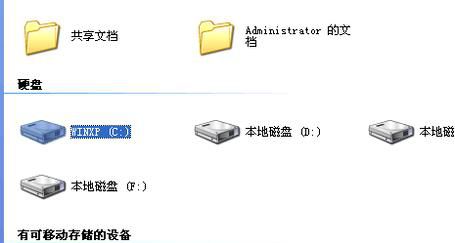
02、右键点C盘,选择“属性”。
03、点“磁盘清理”。
04、点击“internet临时文件”。
05、点“确定”。
06、法二
点开“金山毒霸”。
07、点击“清理”。
08、扫描中。
09、点击“一键清理”。
10、清理中。
11、完成。
12、法三
新建一个记事本。
13、粘贴以下信息。
@echo off
echo 正在清除系统垃圾文件,请稍等......
del /f /s /q %systemdrive%*.tmp
del /f /s /q %systemdrive%*._mp
del /f /s /q %systemdrive%*.log
del /f /s /q %systemdrive%*.gid
del /f /s /q %systemdrive%*.chk
del /f /s /q %systemdrive%*.old
del /f /s /q %systemdrive%recycled*.*
del /f /s /q %windir%*.bak
del /f /s /q %windir%prefetch*.*
rd /s /q %windir%temp & md %windir%temp
del /f /q %userprofile%cookies*.*
del /f /q %userprofile%recent*.*
del /f /s /q "%userprofile%Local SettingsTemporary Internet Files*.*"
del /f /s /q "%userprofile%Local SettingsTemp*.*"
del /f /s /q "%userprofile%recent*.*"
echo 清除系统LJ完成!
echo. & pause
14、保存为任意名字,后缀为.bat
15、点开记事本,正在清理。
16、法四
点开“我的电脑”。
17、点开“C盘”。
18、选择你想要删除的。
19、放入回收站。
20、完成。