教你做超简单的vbs百度小助手!
接下来让我们一起来学习如何做vbs百度小助手吧!
01、打开电脑,右键单击选择新建文本文档。
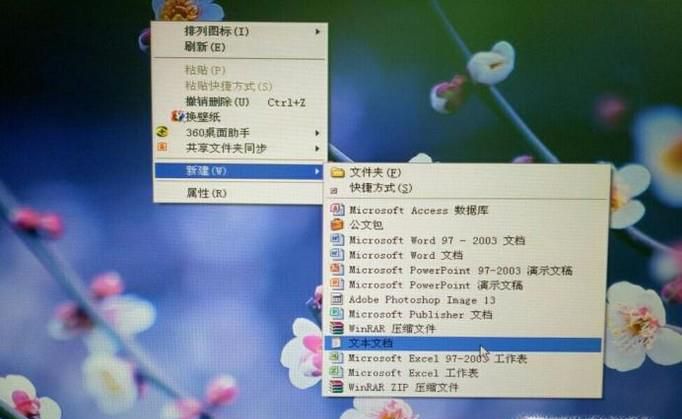
02、建立成功后,桌面上会出现新建文本文档的图标,双击打开。
03、输入
xz=InputBox("1.我要回答;2.歌曲搜索;3,新闻搜索;" & Chr(13) & "4.网页搜索;5.贴吧搜索;6.知道搜索;" & Chr(13) & "7.图片搜索;8.视频搜索;9;百科搜索;","百度小助手 [Null_vbt]","")
If Len(xz)=0 Then
MsgBox "没有选择,脚本退出!",64,"错误"
WScript.Quit
else
Select Case xz
Case 1
x=Urlcode(InputBox("请输入要回答的问题","百度我要回答",""))
If Len(x)=0 Then
MsgBox "没有检测到内容,脚本退出!",64,"错误"
WScript.Quit
else
strurl="http://zhidao.baidu.com/q?word=" & x & "&ct=17&pn=0&tn=ikaslist&rn=10&lm=65536&fr=answersearch_0"
End if
Case 2
x=Urlcode(InputBox("请输入要搜索的歌曲名","百度歌曲搜索",""))
If Len(x)=0 Then
MsgBox "没有检测到内容,脚本退出!",64,"错误"
WScript.Quit
Else
strurl="http://mp3.baidu.com/m?f=ms&tn=baidump3&ct=134217728&lf=&rn=&word=" & x & "&lm=-1"
End if
Case 3
x=Urlcode(InputBox("请输入要搜索的新闻标题","百度新闻搜索",""))
If Len(x)=0 Then
MsgBox "没有检测到内容,脚本退出!",64,"错误"
WScript.Quit
else
strurl="http://news.baidu.com/ns?cl=2&rn=20&tn=news&word=" & x & "&t=1"
End if
Case 4
x=Urlcode(InputBox("请输入要搜索的内容","百度网页搜索",""))
If Len(x)=0 Then
MsgBox "没有检测到内容,脚本退出!",64,"错误"
WScript.Quit
else
strurl="http://www.baidu.com/s?cl=3&wd=" & x
End if
Case 5
x=Urlcode(InputBox("请输入要搜索的贴子标题","百度贴吧搜索",""))
If Len(x)=0 Then
MsgBox "没有检测到内容,脚本退出!",64,"错误"
WScript.Quit
else
strurl="http://tieba.baidu.com/f?kw=" & x
End if
Case 6
x=InputBox("请输入要搜索的知道标题","百度知道搜索","")
If Len(x)=0 Then
MsgBox "没有检测到内容,脚本退出!",64,"错误"
WScript.Quit
else
strurl="http://zhidao.baidu.com/q?ct=17&pn=0&tn=ikaslist&rn=10&word=" & x
End if
Case 7
x=Urlcode(InputBox("请输入要搜索的图片标题","百度图片搜索",""))
If Len(x)=0 Then
MsgBox "没有检测到内容,脚本退出!",64,"错误"
WScript.Quit
else
strurl="http://image.baidu.com/i?tn=baiduimage&ct=201326592&lm=-1&cl=2&word=" & x & "&t=3"
End if
Case 8
x=Urlcode(InputBox("请输入要搜索的视频标题","百度视频搜索",""))
If Len(x)=0 Then
MsgBox "没有检测到内容,脚本退出!",64,"错误"
WScript.Quit
else
strurl="http://video.baidu.com/v?ct=301989888&rn=20&pn=0&db=0&s=7&word=" & x
End if
Case 9
x=Urlcode(InputBox("请输入要搜索的百科标题","百度百科搜索",""))
If Len(x)=0 Then
MsgBox "没有检测到内容,脚本退出!",64,"错误"
WScript.Quit
else
strurl="http://baike.baidu.com/w?ct=17&lm=0&tn=baiduWikiSearch&pn=0&rn=10&word=" & x
End if
End Select
End if
Set objIe = CreateObject("InternetExplorer.Application")
objie.visible=true
objIe.Navigate strUrl
function Urlcode(InpStr)
Dim InpAsc,I
For I = 1 To Len(InpStr)
InpAsc = Asc(Mid(InpStr, I, 1))
If ((InpAsc < 58) And (InpAsc > 47)) Or ((InpAsc < 91) And (InpAsc > 64)) Or ((InpAsc < 123) And (InpAsc > 96)) Then
Urlcode = Urlcode & Chr(InpAsc)
Else
Urlcode = Urlcode & "%" & mid(Trim(Hex(InpAsc)),1,2) & "%" & mid(Trim(Hex(InpAsc)),3,2)
End If
Next
end Function
04、输入完成后,点击左上角另存为,把文件名的后缀改为vbs,点击保存。
05、这样就做好了,桌面会显示制作成功后,桌面出现了一个以“新建文本文档.vbs”为文件名的文件,它就是我们制作的百度小助手。
06、双击打开,如下图所示。